ShopDreamUp AI ArtDreamUp
Deviation Actions


Suggested Deviants


Suggested Collections


You Might Like…


Featured in Groups




Description
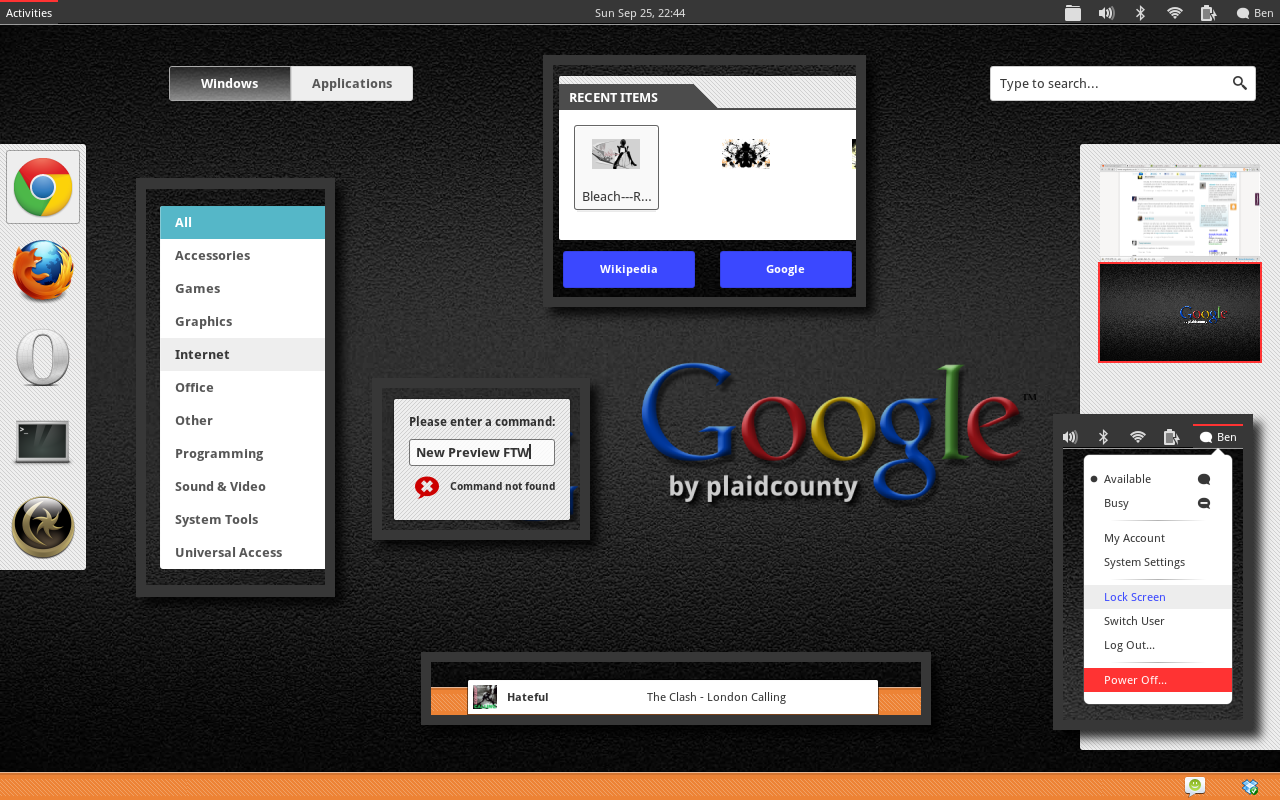
I've been attracted to the new look of google.com and all the web apps in their arsenal. So I figured it should make a pretty good looking gnome-shell theme. Hope you like it!
I included the switches from 0rAX0's Nord theme because they're just so easy on the eyes and I couldn't find any "switches" on google's apps.
Installation:
Put the 'Google-Shell' folder inside ~/.themes and use a theme-selector extension to select it. OR, backup your /usr/share/gnome-shell/theme folder and replace everything inside it with this theme, press ALT+F2 and type 'rt' or 'r'
In case some of you don't like the orange in the message tray, here's a fix:
Replace lines 1214 & 1215 (1215 & 1216 for dark) with:
background-color: white;
in the gnome-shell.css file.
You also need \'Droid Sans\' or 'Open Sans' fonts.
*NEW* I've included a darker overview theme for darker tastes. Just backup the original files and overwrite with the dark files!
Preview of Dark Theme: [link]
*Changelog
25Sep11
V 1.1
-Changed Overview to a dark shade instead of light.
-Added texture to bottom panel, dash, workspaces, modals, and search results.
-Changed Workspace Switcher Arrows.
-Minor tweaks to padding and App-hover.
V 1.2 26Sep11
-New Preview Image!
-Fixed inconsistency with hover and select border on panel.
-Shrunk images to reduce package size.
-Open Sans added as alternative font.
-Fixed 'invisible time' in calendar popup.
-Changed App-Well font color.
V 1.3.2 28Sep11
-Extended Workspace and Modal background for larger resolutions and workspace switcher.
-Included Dark Theme and instructions.
V 1.3.3 28Sep11
-Changed Overview Close-Window image to represent 'Chrome' close-tab button.
V 1.4 02Oct11
-Fixed Overview and Search Results unreadable lettering.
-Now Compliant with gnome-shell 3.2. Yay!
V 1.5 15Oct11
-Really actually reworked to comply with gnome 3.2. No more freezing!
V 1.5.1 19Oct11
-Fixed Running App effect.
I included the switches from 0rAX0's Nord theme because they're just so easy on the eyes and I couldn't find any "switches" on google's apps.
Installation:
Put the 'Google-Shell' folder inside ~/.themes and use a theme-selector extension to select it. OR, backup your /usr/share/gnome-shell/theme folder and replace everything inside it with this theme, press ALT+F2 and type 'rt' or 'r'
In case some of you don't like the orange in the message tray, here's a fix:
Replace lines 1214 & 1215 (1215 & 1216 for dark) with:
background-color: white;
in the gnome-shell.css file.
You also need \'Droid Sans\' or 'Open Sans' fonts.
*NEW* I've included a darker overview theme for darker tastes. Just backup the original files and overwrite with the dark files!
Preview of Dark Theme: [link]
*Changelog
25Sep11
V 1.1
-Changed Overview to a dark shade instead of light.
-Added texture to bottom panel, dash, workspaces, modals, and search results.
-Changed Workspace Switcher Arrows.
-Minor tweaks to padding and App-hover.
V 1.2 26Sep11
-New Preview Image!
-Fixed inconsistency with hover and select border on panel.
-Shrunk images to reduce package size.
-Open Sans added as alternative font.
-Fixed 'invisible time' in calendar popup.
-Changed App-Well font color.
V 1.3.2 28Sep11
-Extended Workspace and Modal background for larger resolutions and workspace switcher.
-Included Dark Theme and instructions.
V 1.3.3 28Sep11
-Changed Overview Close-Window image to represent 'Chrome' close-tab button.
V 1.4 02Oct11
-Fixed Overview and Search Results unreadable lettering.
-Now Compliant with gnome-shell 3.2. Yay!
V 1.5 15Oct11
-Really actually reworked to comply with gnome 3.2. No more freezing!
V 1.5.1 19Oct11
-Fixed Running App effect.
![[link]](https://www.deviantart.com/users/outgoing?https://lh3.googleusercontent.com/-85Wk3-EMwO0/UQWPx2DbZII/AAAAAAAAAGM/RZqim-YsAyY/s894/google+shell+overview.png)
![[link]](https://www.deviantart.com/users/outgoing?https://lh3.googleusercontent.com/-80SzgwaFO88/UQWPqu1wnAI/AAAAAAAAAGE/U6EXi4KJ-qU/s894/google+shell.png)